Preparing the dataset description
To generate harmonized data using Neurobagel, you must prepare a dataset description file.
This is a JSON file that includes specific fields describing the dataset and how to access the data.
This file is adapted from the dataset_description.json from BIDS.
Information from the dataset description will be displayed to a user when they discover your dataset in the Neurobagel query tool.
Example
{
    "Name": "BIDS synthetic",
    "Authors": [
        "Markiewicz, C. J.",
        "Gau, Rémi"
    ],
    "ReferencesAndLinks": [
        "https://bids-website.readthedocs.io/en/latest/datasets/examples.html#mri"
    ],
    "Keywords": ["synthetic", "nback"],
    "RepositoryURL": "https://github.com/bids-standard/bids-examples.git",
    "AccessInstructions": "Clone the git repository. The dataset is located in the 'synthetic' subdirectory.",
    "AccessType": "public",
    "AccessEmail": "bids.curator@gmail.com",
    "AccessLink": "https://github.com/bids-standard/bids-examples.git"
}
How this dataset info will appear in the query tool:
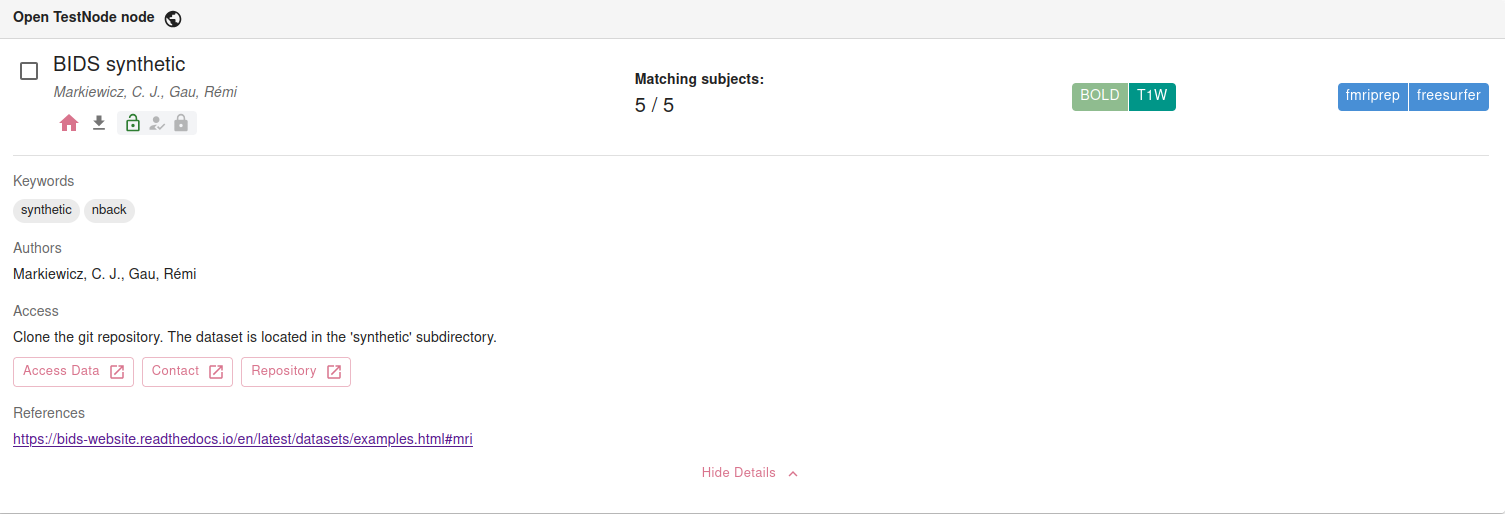
Editable template
Below is an editable and copy-pasteable template for your dataset description JSON. For more information on each field, see Dataset description fields.
Tips
- Click the underlined fields to edit the placeholder values.
- Fields wrapped in square brackets
[]expect a list of comma-separated strings, e.g.["Item 1", "Item 2"]. - To leave any fields empty, delete the placeholder value.
{
    "Name": "DATASET NAME",
    "Authors": ["AUTHORS"],
    "ReferencesAndLinks": ["LINKS"],
    "Keywords": ["KEYWORDS"],
    "RepositoryURL": "URL",
    "AccessInstructions": "INSTRUCTIONS",
    "AccessType": "TYPE",
    "AccessEmail": "EMAIL",
    "AccessLink": "URL"
}
After editing, copy and save the contents in a file with the extension .json.
We recommend using an informative file name like DATASETNAME_description.json.
I have a dataset_description.json from my BIDS dataset
Your existing valid BIDS dataset_description.json can be directly used for Neurobagel without modification,
but we strongly recommend adding the optional Neurobagel-supported keys to improve dataset FAIRness and dataset discoverability in Neurobagel:
"RepositoryURL""AccessInstructions""AccessType""AccessEmail""AccessLink"
(These additional fields will not make the dataset_description.json invalid and will be safely ignored by the BIDS validator.)
NOTE: The editable template does not include all required keys for a valid BIDS dataset_description.json. Do not overwrite your existing BIDS dataset_description.json with the template, only add Neurobagel-supported keys as needed.
Dataset description fields
Neurobagel recognizes the following fields in the dataset description JSON file. Extra keys are ignored. * indicates a key adopted from the BIDS dataset_description.json.
| Key name | Requirement level | Data type | Description |
|---|---|---|---|
| Name* | REQUIRED | string | Name of the dataset. This name will be displayed when users discover the dataset in a Neurobagel query. |
| Authors* | RECOMMENDED | list of strings | List of individuals who contributed to the creation/curation of the dataset. |
| ReferencesAndLinks* | RECOMMENDED | list of strings | List of links or references that contain information on the dataset. NOTE: The first valid URL in this list will also be used as the dataset homepage when the dataset is discovered in the Neurobagel query tool. |
| Keywords* | RECOMMENDED | list of strings | List of keywords describing the content or subject matter of the dataset. |
| RepositoryURL | RECOMMENDED | string | URL to a repository where the dataset can be downloaded or retrieved from (e.g., DataLad, Zenodo, GitHub). |
| AccessInstructions | RECOMMENDED | string | Description of how to access the data. |
| AccessType | RECOMMENDED | string, one of: "public", "registered", "restricted" |
Level of requirements for accessing the data. public: Immediately accessible without registration, authentication, or approval. registered: Requires authentication or agreement to basic terms of use, but no formal application or review. restricted: Requires formal approval or review of a data access request. |
| AccessEmail | RECOMMENDED | string (email) | Primary email for access requests. |
| AccessLink | RECOMMENDED | string | Primary link for access requests or information. |